How to Photograph the Milky Way With Your Phone: Settings That Work
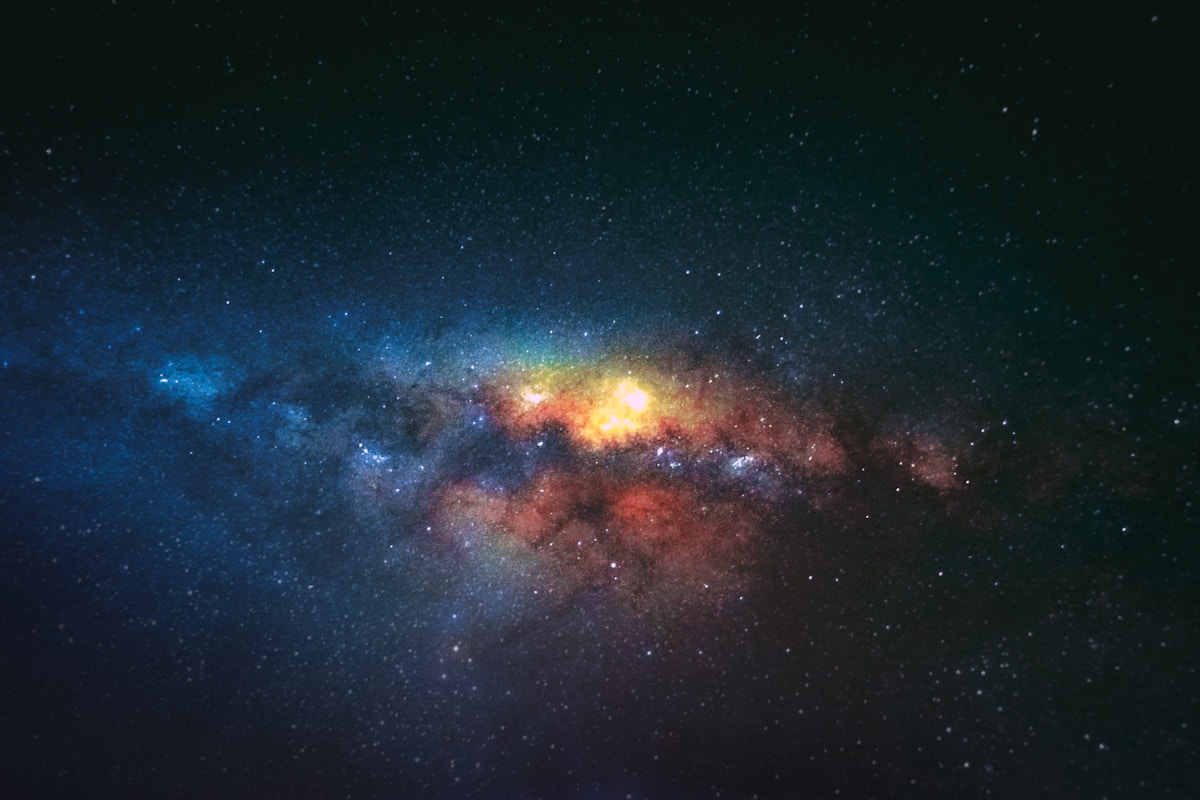
- Primary Signal: How to Photograph the Milky Way With Your Phone: Settings That Work
- Overview: Modern phones can capture the Milky Way if you use manual controls, a tripod, and a dark sky. These settings and techniques turn a faint smudge into a real galactic portrait....
- Verification: Analyzed and compiled by FreeSky Cosmos editorial monitoring desk.
Phone astrophotography became practical when manufacturers added manual or pro modes, long exposures, and night modes that stack multiple frames. The key requirements are a phone that lets you control ISO, shutter speed, and focus manually, or at least a dedicated astrophotography mode, plus a way to hold the phone perfectly still for ten to thirty seconds. Without a tripod, even a small shake turns stars into streaks, so a cheap phone tripod or a beanbag on a stable surface is the first accessory worth buying.
Darkness matters more than the phone model. From a city, light pollution drowns the Milky Way's faint glow no matter how good your camera is, while from a dark rural site even a three-year-old phone can record the galactic core. Check the Moon's phase and pick a night near new Moon, find the darkest sky within reach, and give your eyes and your expectations time to adjust. The galactic core, the brightest and most photogenic part, is best placed in the evening sky during the summer months in the northern hemisphere.
Start with these baseline settings in pro mode: ISO 1600 to 3200, shutter speed 15 to 25 seconds, focus set manually to infinity, and white balance around 3800 to 4500 Kelvin. The shutter limit matters because Earth's rotation moves stars across the frame; beyond about 25 seconds at wide focal lengths, stars begin to trail noticeably. Take several frames at slightly different settings and compare them on the spot, zooming in to check whether stars are sharp points rather than short lines.
If your phone has an astrophotography mode, it will typically take a series of short exposures and stack them automatically, which reduces noise and often beats a single manual frame. Whichever mode you use, shoot in RAW or the highest-quality format available, because heavy editing of a compressed JPEG quickly reveals banding in the dark sky. Use the self-timer or a remote shutter so pressing the button does not shake the phone, and turn off any flash.
A straight-out-of-camera Milky Way shot usually looks dim, and that is normal; the image needs gentle editing to reveal what the sensor captured. Raise exposure slightly, lift the shadows carefully, increase contrast, and reduce noise, but resist the temptation to push saturation to neon levels, which is the giveaway of an over-processed astro photo. A subtle increase in white balance warmth can make the galactic core glow naturally, and a slight clarity boost helps dust lanes stand out.
The most common mistakes are shooting under a bright Moon, forgetting to focus manually so stars blur, and standing under a nearby light that flares into the lens. Shield the phone from stray lights with your body or a jacket, keep the lens clean, and take many frames rather than trusting one perfect shot. With practice, a phone image of the Milky Way becomes a satisfying record of a dark-sky night, and the skills transfer directly if you later move to a dedicated camera.
Once you have a keeper image, consider what separates a good phone astrophoto from a great one: foreground. A lone tree, a rock formation, a tent glowing with warm light, or a distant mountain ridge gives the Milky Way scale and turns a sky snapshot into a landscape photograph. Scout your foreground during daylight, return after dark, and compose with the galactic core above it, keeping your phone level and still. Take multiple frames so you can pick the sharpest, and remember that the best astrophotography is patient photography. The Milky Way is not going anywhere; it returns every clear, moonless night, and each session sharpens both your images and your eye.
📖 Continue Reading the Full Story
Continue reading this article on FreeSky Cosmos.
⚡ Access Full Content NowMore from FreeSky Cosmos


 🤖 WinBar AI
Decision-Making Framework: GST Calculator — Add or Extract GST & VAT (Day 28 Guide)
How data from our GST Calculator — Add or Extract GST & VAT on WinBar AI. Discover essential eliminates bias, ...
 ☁️ FreeSky Cloud
Comparative Review: Freelancer Net Pay Calculator (PKR) — Upwork, Fiverr & Payoneer Fees (Day 11 Guide)
Why our free online Freelancer Net Pay Calculator (PKR) — Upwork, Fiverr & Payoneer Fees on FreeSky Cloud. Dis...
🛰️ FreeSky Aerial
Troubleshooting Guide: Freelancer Net Pay Calculator (PKR) — Upwork, Fiverr & Payoneer Fees (Day 12 Guide)
Diagnosing hidden issues using the Freelancer Net Pay Calculator (PKR) — Upwork, Fiverr & Payoneer Fees on Fre...
 🗺️ FreeSky GeoData
Technical Breakdown: Freelancer Net Pay Calculator (PKR) — Upwork, Fiverr & Payoneer Fees (Day 14 Guide)
Architectural examination of our Freelancer Net Pay Calculator (PKR) — Upwork, Fiverr & Payoneer Fees on FreeS...